

Solutions to help you transition away from smartphones into a more distraction-free and tech-lite way of living.

The problem: Smartphones have provided so much convenience and impressive technology that we "can't live without" over the years. But they are also designed to be as addictive and attention-grabbing as possible. This is not so useful.
They are never off. You are at the constant beck and call to your phone's demands. Notifications, news feeds, headlines, 15-second videos, endless images to scroll through...
The solution: Make your phone dumb!
There are three options outlined in this post:
- Go the full hog. Sell your smartphone and buy a basic Nokia or other "dumbphone".
- Invest in a "transition phone". This is what I use and it's somewhere in between the first and third option.
- Keep your smartphone but modify the hardware, apps and your habits to make it less distracting.
Jump to:
Dumbphones
Switching to a "dumb" phone is the easiest and most bullet-proof option. Simply transfer all your contacts to your SIM card and switch to a basic retro-style Nokia or similar.
So what constitutes a dumbphone?
A phone without an app store, touch screen or endless distractions. Think 90's Nokia.
In fact, the 90s Nokia style has become so popular again they even have a section dedicated to dumbphones now. The only thing you'll be able to do on these phones is call and text, play Snake and use basic utilities like the torch and calculator.
Some come with internet but there are no touch screens making it near impossible to use.
How to replace all the functions of a smartphone
If you rely on your phone for listening to music, GPS and some other functions, here are some workarounds:
- Get an old MP3 player for listening to music and podcasts.
- Carry a local map and compass with you.
- Get a mini digital camera if you like to take photos.
- Keep in touch with people via old-fashioned text, email and phone calls.
- Carry a mini torch in your bag (or a cute torch key chain!)
- Switch your banking and utilities to online or in-person.
- Keep a pen and paper with you for note-taking and reminders.
- When you want to Google something, write it down and look it up later.
- Use a digital watch for alarms (many dumbphones can do this too).
Unfortunately, modern life has tried to chain us to our phones by forcing us to own one for work, to keep in contact with family, to pay bills, for "security" and other reasons.
Breaking free from these chains is liberating but not always practical right away.
You can ease into it with a transition phone or by tweaking your current smartphone. See below.
Transition phones
If, like me, you find it difficult to transition away from your smartphone due to practicalities - try a dumb smartphone.
What's that? Well, there isn't an exact definition but it's basically a smartphone where you can still use all the apps you need, but not in a way that is easy or addictive to use.
I swapped my 6-inch brick of an iPhone for a 3-inch Jelly 2E mini smartphone.
It means I can keep messaging apps to call and message family and other important things but the tiny screen makes using it for long periods a headache because I can barely see what the hell I'm looking at.
As a result, I only use it for necessities and loathe any time I need to type or search for anything on it.
It sounds like I'm bad-mouthing it but this is exactly the effect I was hoping for.
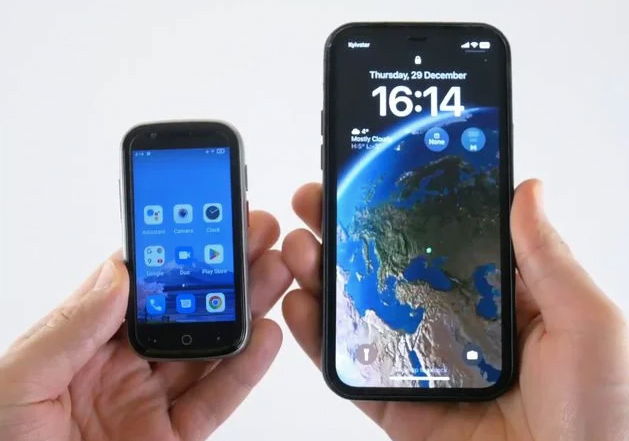
When looking for a transition phone, you want to make sure you have what you need and (preferably) nothing else.
You can try opting for a small screen, like I have, or choosing a phone with dial buttons that make it harder to type. Sometimes simply choosing a phone that is a bit slow and cumbersome makes a good deterrent!
Some more options for some "dumb" smartphones:
- Doro phones
- The Light phone
- CAT S22
- AGM M7
How to dumb down your smartphone
If you're not ready to make a phone change just yet, there are lots of ways to make your current phone dumb and much less distracting for you.
Try the following:
- Delete all apps that aren't strictly necessary.
- Turn off notifications except emergency contact calls.
- Keep Wi-Fi and data turned off until you need to use it.
- Install a minimalist launcher.
- Set a long passcode and disable face or fingerprint recognition to make it more difficult to pick up every 10 seconds.
- Deactivate the default browser.
- Turn your display into greyscale.
- Try leaving your phone at home when you go out.
- Have a set "place" for your phone (not your bedroom). Put it back in that place instead of keeping it next to you.

Resources
- I highly recommend The Dumbphone Finder which allows you to search through phones by filtering features.
- The r/Dumbphones subreddit. I'm hesitant to ever recommend going on Reddit but this is a good resource to find out more about which phone is right for you.
FAQ
You can either:
1) Use a transition phone to keep the apps but disable notifications for groups and unnecessary updates. You can use web-based texting for WhatsApp, Signal and other messaging services to avoid using your phone so much.
2) Encourage people to keep in contact via text, video calls, email, and meeting up in person. You may have some FOMO from no longer being involved in group chats but you can request to be kept up to date on all the things that really matter.
The answer will very much depend on your model of phone. Some come with a memory card that allows you to add MP3 files.
If not, I highly recommend getting yourself a small and inexpensive MP3 player. Read more here on my setup.
Some dumbphones have GPS but usually, it will be very basic and difficult to use, especially compared to Google Maps.
I recommend getting used to using your GPS apps less. If you need to, carry around a local pocket map and compass.
First use The Dumbphone Finder to see which ones are available in your country's network, then find stockists online. Some models you will need to purchase through sites like AliExpress and eBay but the more modern ones are available on places like Amazon and local phone retailers.


Leave a Reply